Disclosure: This page may contain affiliate links. We may earn a small commission at no extra cost to you. Learn more.
LinkedIn is more than just a professional networking site — it’s packed with powerful features that can significantly elevate your job search or career growth. Yet, many users are missing out on some of its newest and most valuable features.
In this blog, we’ll reveal three powerful ways to unlock the hidden potential of your LinkedIn profile, including a brand-new feature that could make all the difference when it comes to standing out from the crowd.
1. Generate Resumes from Your LinkedIn History with KudosWall’s Import and Improve Feature
Did you know that your LinkedIn profile holds the key to building job-specific resumes in minutes? With KudosWall’s Import and Improve feature, you can instantly turn your LinkedIn history into a tailored, ATS-optimized resume.
Here’s the secret:
- Simply upload your LinkedIn profile to KudosWall.
- With the Import and Improve feature, you can enhance your resume by customizing it for the specific job description you’re targeting. KudosWall analyzes the job requirements and refines your profile data to create a highly targeted resume.
No more spending hours trying to tweak your resume for each job — this tool does it all for you, in just a few clicks! For detailed information read 👇
2. Attract Recruiters Instantly with a Magnetic LinkedIn Headline
Your LinkedIn headline is more than just a job title — it’s your chance to make a powerful first impression. A well-optimized headline acts like a magnet, pulling in recruiters who are searching for talent like yours.
KudosWall’s LinkedIn Optimizer takes this to the next level by:
- Generating attention-grabbing headlines based on your resume and keywords in your field.
- Crafting a powerful summary that highlights your skills, experience, and unique value.
With just a few adjustments, you can turn your LinkedIn profile into a recruiter’s dream search result. The right headline can be the difference between getting noticed or being overlooked.

3. New Feature Alert! Add Website Links to Showcase Your Work
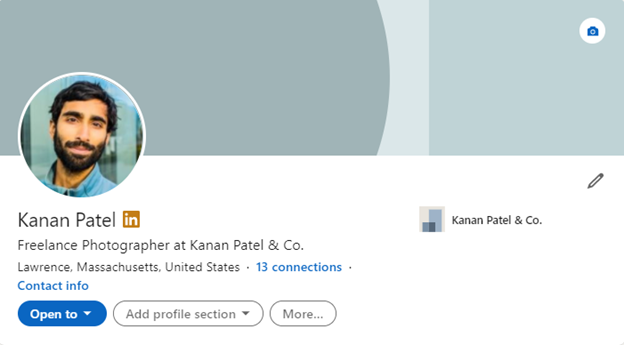
Here’s a hidden gem: LinkedIn now allows you to add website links directly to the top of your profile! This recently added feature is a game-changer for professionals who want to showcase their portfolios, GitHub repositories, or personal websites.
How to use it:
- Go to your LinkedIn profile and click “Edit Intro.”
- In the Website section, you can now add a direct link to your most relevant work.
- Customize the link text to something engaging like “Explore My Work” or “View My Projects” or “Contact info” as shown in the image above.
This new feature places your most important achievements right in front of recruiters’ eyes, making it easy for them to view tangible examples of your skills and accomplishments.
Conclusion
Don’t let these hidden LinkedIn features pass you by! From generating tailored resumes to crafting magnetic headlines and using brand-new tools like the website link feature, there are so many ways to level up your LinkedIn profile.
Make sure you’re getting the most out of your LinkedIn experience with KudosWall’s powerful tools — helping you land more interviews and make stronger career connections.


Leave a Reply